

In today’s digital age, automation tools are transforming how we interact with computers and mobile devices. One such simple yet powerful tool is the auto clicker.
Whether you are a gamer, developer, or office professional, Auto Clickers can help automate repetitive tasks and improve efficiency. However, like any technology, they come with both advantages and potential risks.
In this article, we will explore the uses, benefits, and risks of auto clickers in detail, helping you understand when and how to use them responsibly.
Table of Contents
What is an Auto Clicker?
An auto clicker is a software program that automates mouse clicks on a computer or taps on a mobile device. Instead of manually clicking repeatedly, the tool performs clicks automatically based on predefined settings such as speed, interval, and position.
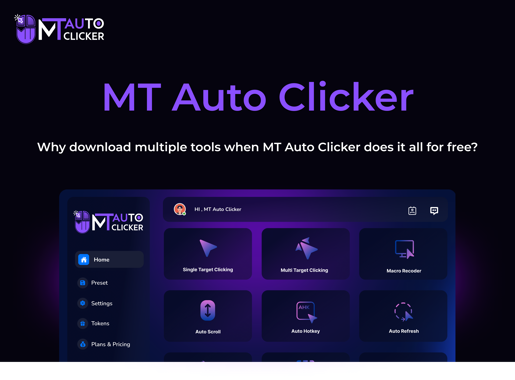
Popular tools like MT Auto Clicker are widely used due to their simplicity and flexibility.
How Auto Clickers Work?
Auto clicker simulate mouse input events. They send signals to the operating system, which interprets them as real clicks. Key features include:
- Adjustable click intervals (milliseconds to seconds)
- Custom click types (left, right, double)
- Fixed or dynamic cursor positioning
- Start/stop hotkeys for easy control.
Once configured, the auto clicker repeats the click process until stopped.
Common Uses of Auto Clicker
Auto clicker are used across various domains. Let’s explore the most common use cases.
1. Gaming

One of the most popular uses of Auto Clickers is in gaming. In many idle or clicker games, players must tap or click continuously to progress. Auto clicker help:
- Automate repetitive tapping
- Speed up gameplay
- Reduce manual effort
For example, in clicker games, faster clicks lead to faster rewards and progression.
2. Data Entry and Office Tasks

Auto clicker are useful for professionals handling repetitive tasks such as:
- Clicking through forms
- Submitting entries
- Navigating dashboards
They help save time and reduce human effort in monotonous tasks.
3. Software Testing

Developers and QA testers use auto clicker to simulate user behavior. They can:
- Test UI responsiveness
- Perform repeated actions
- Identify bugs in applications.
This helps ensure that software performs well under repeated usage.
4. Web Automation
Auto clicker are often used in browsers like Google Chrome for:
- Refreshing pages
- Clicking buttons repeatedly
- Automating simple workflows
They are especially useful for basic automation tasks without complex coding.
5. Accessibility Support

Auto clicker can assist users with physical limitations who find it difficult to perform repeated mouse clicks. This makes computing more accessible and user-friendly.
Benefits of Using Auto Clicker
Auto clickers offer several advantages when used correctly.
- Saves Time: One of the biggest benefits is time efficiency. Tasks that take hours manually can be completed much faster with automation.
- Reduces Physical Strain: Continuous clicking can lead to fatigue or repetitive strain injuries. Auto clicker reduce the need for constant manual effort.
- Improves Productivity: By automating repetitive tasks, users can focus on more important activities, increasing overall productivity.
- Consistency and Accuracy: Auto clickers perform actions with consistent timing and accuracy, reducing human error.
- Easy to Use: Most auto clickers are simple and user-friendly, requiring minimal setup and no advanced technical knowledge.
Risks of Using Auto Clickers
Despite their advantages, auto clicker also pose certain risks.
1. Violation of Terms of Service
Many games and online platforms do not allow the use of automation tools. Using auto clickers may result in:
- Account bans
- Suspensions
- Loss of progress
Always check platform rules before using them.
2. Security Threats
Downloading Auto Clickers from untrusted sources can expose your system to:
- Malware
- Spyware
- Adware
It is important to use only trusted software.
3. System Performance Issues
Extremely fast click settings can cause:
- System lag
- Application crashes
- Browser freezing
Proper configuration is essential to avoid these issues.
4. Over-Automation
Relying too much on automation can lead to:
- Reduced manual control
- Errors in complex tasks
- Lack of oversight
Not all tasks should be automated.
5. Ethical Concerns
Using auto clicker in competitive environments can be considered unfair. It may give users an advantage over players who play manually.
Advantages vs Risks Comparison
| Aspect | Benefits | Risks |
| Efficiency | Saves time | May cause over-automation |
| Performance | Faster task completion | System overload |
| Gaming | Easier progression | Account bans |
| Accessibility | Helps users with limitations | Misuse concerns |
Best Practices for Safe Usage
To use auto clickers effectively and safely, follow these guidelines:
- Use Trusted Software: Always download tools like MT Auto Clicker from official sources.
- Avoid Sensitive Tasks: Do not use auto clicker on banking or personal accounts.
- Follow Platform Rules: Check whether the platform allows automation before using it.
- Set Reasonable Speeds: Avoid extremely fast click intervals, as they can crash your system.
- Monitor Performance: Keep an eye on your system and application behavior while using automation.
When Should You Use an Auto Clicker?
Auto clickers are best suited for:
- Repetitive and simple tasks
- Idle or non-competitive games
- Basic automation needs
- Testing and development
They are not suitable for:
- Complex decision-based tasks
- Secure or sensitive operations
- Competitive gaming environments
Future of Auto Clickers
As technology evolves, auto clickers are becoming more advanced. Future trends include:
- AI-based automation
- Smarter interaction with UI elements
- Integration with larger automation systems
Auto clickers may evolve into more intelligent tools capable of handling complex workflows.
Conclusion
Auto clickers are powerful tools that simplify repetitive tasks and improve efficiency. From gaming to professional work, they offer a wide range of applications that can save time and reduce effort.
However, they also entail risks, such as security threats, system performance issues, and potential violations of platform rules. It is important to use them responsibly and ethically.
By understanding their uses, benefits, and risks, and by following best practices, you can make the most out of auto clickers while avoiding potential problems. When used correctly, they can be a valuable addition to your digital toolkit.