

In modern gaming, efficiency and speed can make a huge difference in how quickly you progress. Many games—especially idle, click-based, and grinding-heavy titles—require repetitive actions that can become tiring over time. This is where auto click macros come into play.
Auto click macros take automation one step further than basic Auto Clicker. Instead of just repeating a single click, they allow you to automate a sequence of actions. When used correctly, they can help you play smarter, reduce manual effort, and improve your overall gaming performance.
In this guide, we’ll explore how auto click macros work, how to use them effectively, and how to optimize them for a professional-level gaming experience.
Table of Contents
What Is an Auto Click Macro?
An auto click macro is an advanced automation tool that records and replays a series of clicks or actions. Unlike a simple auto clicker that repeats one action, a macro can perform multiple steps in a specific order.
For example, a macro can:
- Click multiple buttons in sequence.
- Add delays between actions.
- Repeat a full workflow automatically.
This makes auto clicker macros highly useful for complex gaming tasks.
How Auto Click Macros Work?
Auto click macros operate by recording user input and replaying it exactly as configured.
Step 1 – Recording Actions
You perform a sequence of clicks manually while the macro records your actions.
Step 2 – Setting Timing
The tool captures delays between each action, ensuring realistic timing.
Step 3 – Playback Automation
Once recorded, the macro repeats the entire sequence automatically.
This allows you to automate complex tasks with precision.
Why Use Auto Click Macros in Gaming?
Auto click macros offer several advantages over traditional auto clickers.
- Handles Complex Tasks: Many games require more than just clicking one button. Macros allow you to automate entire workflows.
- Saves Time and Effort: Instead of repeating the same actions manually, you can let the macro handle everything.
- Improves Efficiency: Macros reduce errors and ensure consistent performance, helping you progress faster.
- Reduces Physical Strain: Continuous clicking can cause fatigue. Macros eliminate the need for constant input.
Setting Up an Auto Click Macro
Getting started with auto clicker macros is simple if you follow the right steps.
Step 1 – Choose the Right Tool
Select a reliable macro tool that supports recording and playback features.
Step 2 – Record Your Actions
Perform the actions you want to automate while the macro records them.
Step 3 – Adjust Timing
Fine-tune delays between actions to match the game’s response speed.
Step 4 – Assign a Hotkey
Set a keyboard shortcut to start and stop the macro easily.
Step 5 – Test the Macro
Run the macro in a controlled environment to ensure it works correctly.
Best Practices for Using Macros Like a Pro
To use auto click macros effectively, you need to go beyond basic setup.
- Keep Timing Realistic: Avoid extremely fast actions that may not register properly in the game.
- Optimize Action Sequences: Remove unnecessary steps to make your macro more efficient.
- Use Loops Wisely: Set your macro to repeat actions only as needed to avoid system overload.
- Monitor Performance: Always keep an eye on how the macro behaves during gameplay.
- Save Multiple Configurations: Create different macros for different tasks to improve flexibility.
Advanced Macro Techniques
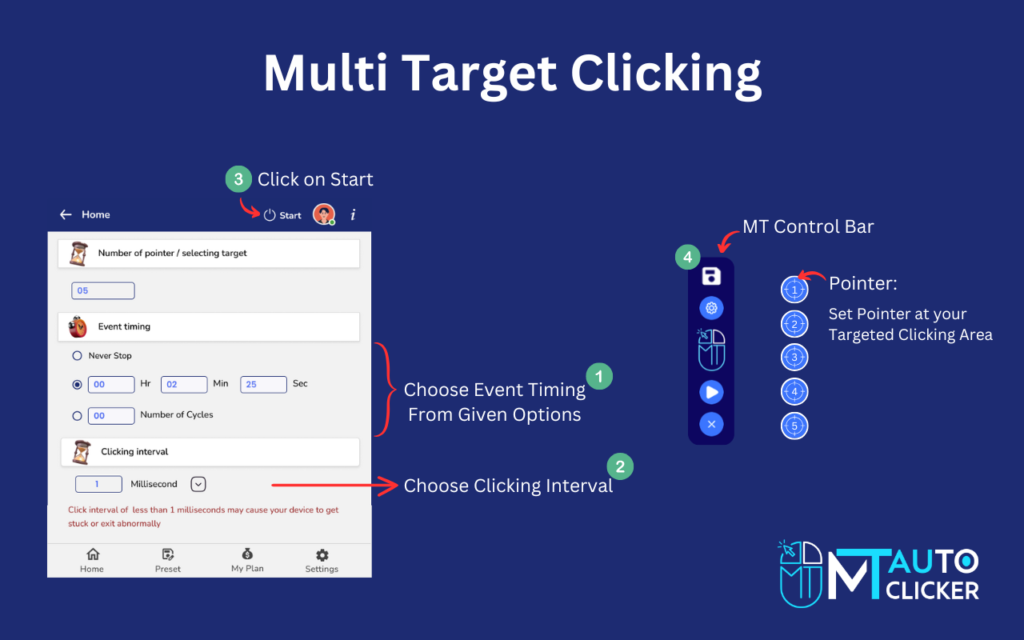
Once you are comfortable with basic macros, you can explore advanced techniques.
- Multi-Step Automation: Create macros that perform several actions across different parts of the screen.
- Conditional Actions: Some advanced tools allow macros to respond to certain conditions in the game.
- Script-Based Macros: Use scripting to create highly customized automation workflows.
These techniques are ideal for experienced users who want maximum efficiency.
Common Mistakes to Avoid
Even experienced players can make mistakes when using macros.
- Overloading the Macro: Too many actions can make the macro slow or unstable.
- Ignoring Game Mechanics: Every game has limits. Your macro should align with those limits.
- Skipping Testing: Always test your macro before using it in long sessions.
- Using Maximum Speed: Excessive speed can reduce effectiveness and cause errors.
Avoiding these mistakes will help you use macros more effectively.
Safety and Fair Use
While auto click macros are powerful, they should be used responsibly.
- Follow Game Rules: Some games restrict automation tools. Always check the rules before using macros.
- Avoid Competitive Misuse: Using macros in competitive or multiplayer games may lead to penalties.
- Use for Convenience, Not Exploitation: Macros should enhance your gameplay, not give you an unfair advantage.
Responsible usage ensures a safe and enjoyable experience.
Benefits of Using Auto Click Macros
Let’s summarize the key benefits:
- Automates complex tasks
- Saves time and effort
- Improves consistency
- Reduces manual strain
- Enhances overall gaming performance
These advantages make auto click macros a valuable tool for gamers.
Future of Auto Click Macros
Automation tools are constantly evolving. Future developments may include:
- AI-powered automation
- Smart action detection
- Improved scripting capabilities
- Enhanced performance optimization
These innovations will make macros even more powerful and user-friendly.
Final Thoughts
Auto click macros are a game-changing tool for players who want to improve efficiency and reduce repetitive effort. Automating sequences of actions allows you to focus on strategy rather than constant clicking.
However, the key to success lies in proper setup and responsible usage. By understanding your game mechanics, optimizing your macros, and following best practices, you can use these tools like a pro.
Remember, it’s not just about automation—it’s about smart automation. With the right approach, auto click macros can significantly enhance your gaming experience and help you progress faster than ever.